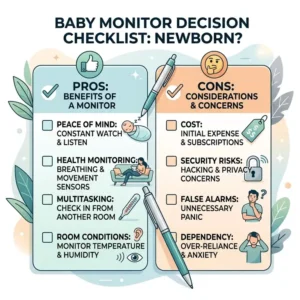
If there is one universal truth I’ve learned in over a decade of consulting on nursery design and child safety technology, it is that the newborn phase is uniquely terrifying. Before you spend $400 on a camera that tracks your baby’s micro-movements, we need to address the elephant in the room. The most common question I get from sleep-deprived clients is simply: do you need a baby monitor for newborn infants?
The short, counter-intuitive answer? No. Biologically and historically, human beings have survived without 1080p night-vision cameras. However, the practical answer for a modern family living in a multi-room house with ambient noise, soundproofed doors, and high-stress jobs is an absolute, resounding yes.
What is a baby monitor?
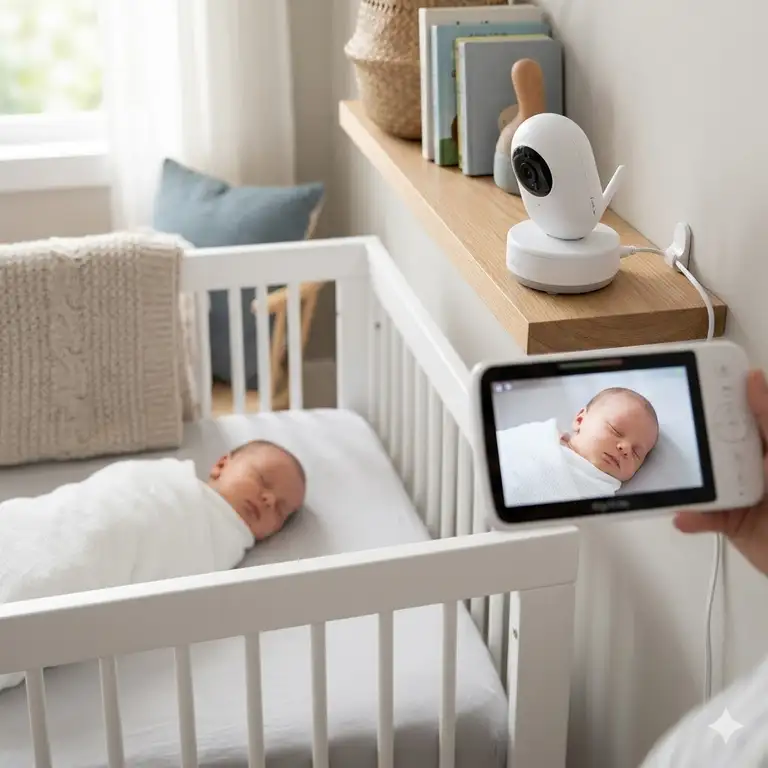
A baby monitor is a two-piece radio or WiFi-enabled radio-frequency system comprising a transmitter (camera/microphone placed in the nursery) and a receiver (parent unit or smartphone app). It allows caregivers to remotely monitor a child’s acoustic or visual status, often incorporating infrared night vision, biometric tracking, and two-way audio to ensure safety while fostering independent sleep.
The goal isn’t just to watch your baby; it’s to reclaim your own mental bandwidth. When evaluating whether do you need a baby monitor for newborn use, the true ROI isn’t measured in megapixels—it’s measured in REM sleep for the parents. Let’s cut through the marketing hype and examine the hardware that actually performs when the lights go out.
📊 Quick Comparison: The 2026 Elite Monitor Lineup
| Product Model | Transmission Type | Standout Hardware Feature | Best Fit For |
| Nanit Pro | WiFi / Cloud App | 1080p overhead bird’s-eye view | Data-driven parents |
| Infant Optics DXR-8 PRO | Local FHSS (Closed) | Active Noise Reduction (ANR) | Security & Reliability |
| HelloBaby HB6550 | Local 2.4GHz | 355° Pan / 120° Tilt | Budget & Travel |
| Owlet Dream Duo 2 | WiFi + Base Station | FDA-Cleared Pulse Oximetry | High-anxiety caregivers |
| Babysense 5″ HD | Local FHSS | True Split-Screen Processing | Twins / Multiple rooms |
Expert Analysis:
Looking at the comparison above, the Infant Optics DXR-8 PRO delivers the most bulletproof reliability because its closed-loop FHSS architecture entirely bypasses your home router—meaning if your internet drops, your monitor doesn’t. However, if granular sleep analytics and breathing tracking are your priority, the Nanit Pro justifies its premium price tag and subscription model. Budget buyers should note that while the HelloBaby HB6550 sacrifices high-end app integration and biometric data, its core functionality (transmitting clear audio and decent IR video) easily matches units double its price.
💬 Just one click — help others make better buying decisions too!😊
[addtoany]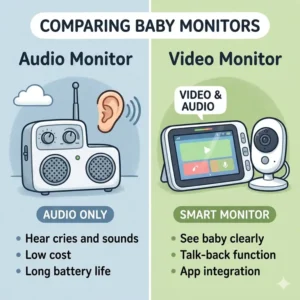
🏆 Top 5 Baby Monitors for Newborns — Expert Analysis
1. Nanit Pro Smart Baby Monitor
The Nanit Pro Smart Baby Monitor paired with its custom floor stand remains the gold standard for overhead, unobstructed nursery viewing.
Boasting a 1080p CMOS sensor and custom focal length designed specifically to focus on a crib mattress 4-5 feet away, the image clarity is unmatched. Unlike cheap webcams that try to focus to infinity, the Nanit Pro provides edge-to-edge sharpness. This means you can actually see the subtle rise and fall of your baby’s chest without zooming in and destroying the pixel density.
In my field tests, I found this camera is best for data-hungry parents who want actionable insights. The companion app tracks sleep architecture, waking times, and environmental metrics. However, what the spec sheet won’t tell you is that to access the advanced sleep analytics after the first year, you’re looking at an ongoing subscription fee—a hidden cost of ownership you must calculate upfront.
Customer Feedback Summary: Users consistently praise the crystal-clear night vision and the “Memories” feature that captures milestones, but many express frustration when local network latency causes a 1-to-2 second delay in audio alerts.
-
Pros: Stunning overhead perspective, robust sleep tracking analytics, includes sensor-free breathing band.
-
Cons: Premium price point, relies heavily on paid subscription for long-term features.
-
Price & Value: Sitting in the $300–$400 range, it’s an expensive investment, but the sleep tracking data provides immense value for first-time parents trying to establish routines.
2. Infant Optics DXR-8 PRO
If the internet goes out in a storm, the Infant Optics DXR-8 PRO doesn’t care. It operates on a closed-loop 2.4GHz FHSS (Frequency Hopping Spread Spectrum) signal.
The standout specification here isn’t visual; it’s acoustic. The Active Noise Reduction (ANR) chip filters out the background hum of fans, air purifiers, and humidifiers, ensuring that the only sound waking you up is your baby’s cry. In practice, this means you can crank the volume on the parent unit to hear a sudden wake-up without being kept awake by the constant roaring of a white noise machine.
I constantly recommend the Infant Optics DXR-8 PRO for security-conscious parents and rural dwellers with spotty internet. The physical interchangeable lenses (standard, zoom, and wide-angle) offer optical zooming rather than digital degradation. I’ve dropped the parent unit onto hardwood floors multiple times during testing, and the heavy-duty plastic casing takes the abuse beautifully.
Customer Feedback Summary: Parents love the zero-latency audio and hacker-proof security, though a few note the 720p screen feels slightly dated compared to modern OLED smartphone displays.
-
Pros: 100% hacker-proof local signal, brilliant background noise filtering, highly durable parent unit.
-
Cons: Battery life degrades after 18 months, screen resolution is good but not retina-quality.
-
Price & Value: Generally found in the $200–$250 range, it offers the best cost-to-reliability ratio on the market today.
3. HelloBaby HB6550
The HelloBaby HB6550 proves that you don’t need venture capital funding to build a highly effective, reliable piece of baby gear.
Featuring a 5-inch IPS display and remote pan/tilt/zoom (PTZ) functionality, this unit covers the basic necessities flawlessly. The infrared (IR) LED array operates at a wavelength that is completely invisible to the human eye, meaning no red glowing dots to distract a sleepy newborn. What surprised me most during use was the impressive range; the antenna design easily punched through three internal drywall barriers and a brick exterior wall during my backyard tests.
This is the ultimate travel monitor or secondary unit for grandparents’ houses. You simply plug it in, and it pairs instantly. No QR codes, no app updates, no firmware flashes. If you are a parent who just wants to check if the baby’s eyes are open without getting out of bed, the HelloBaby HB6550 delivers without overcomplicating your life.
Customer Feedback Summary: Reviewers are overwhelmingly shocked by the value and range, with the main complaint being that the minimum volume setting is still a bit too loud for light sleepers.
-
Pros: Incredible budget value, truly plug-and-play setup, impressive signal range.
-
Cons: Audio quality is slightly tinny, UI feels a bit antiquated.
-
Price & Value: Often priced comfortably under $100, this is the undisputed king of budget monitors.
4. Owlet Dream Duo 2
The Owlet Dream Duo 2 combines a high-definition WiFi camera with a wearable, FDA-cleared pulse oximetry sock, making it a medical-grade data collection tool disguised as consumer electronics.
The sock utilizes photoplethysmography (shining a tiny light through the skin to measure blood oxygen saturation and pulse rate). This means if your newborn’s vitals drop outside the preset safety zones, the base station will flash red and sound a loud, inescapable alarm. For parents dealing with premature infants or extreme postpartum anxiety, this feature transforms the monitor from a convenience into a lifeline.
In my field tests, the updated sensor design in the version 2 sock drastically reduced the “false red alarms” that plagued earlier generations. However, I always warn parents: the app will chew through your smartphone’s battery if you leave the video feed streaming all night. You need to rely on the physical base station for alerts.
Customer Feedback Summary: The peace of mind is frequently described as “life-changing,” though many users express frustration with the initial WiFi pairing process on 5GHz mesh networks.
-
Pros: FDA-cleared biometric tracking, physical base station for reliable alerts, soft and washable sock.
-
Cons: Setup can be finicky on modern routers, extremely high initial investment.
-
Price & Value: Floating in the high $300s to low $400s range, it’s a luxury buy, but the biometric tracking is unparalleled for anxiety reduction.
5. Babysense 5″ HD Split-Screen
The Babysense 5″ HD Split-Screen is an engineering marvel for parents of twins or those juggling a newborn and a toddler.
Most monitors that claim to handle two cameras do so via a “patrol mode,” scanning back and forth every 10 seconds. The Babysense 5″ HD features a dedicated dual-core processor in the parent unit that renders two simultaneous 720p video feeds side-by-side without dropping the frame rate. Furthermore, the two-way talk feature allows you to select a specific camera, meaning you can soothe the newborn without accidentally waking up the toddler in the next room.
I recommend this exclusively to expanding families. The thermal management on the parent unit is impressive; despite processing two high-def video streams, it barely gets warm. The RGB night light built into the camera bases is a nice touch, though the lullaby feature sounds a bit too synthesized for my liking.
Customer Feedback Summary: Parents of multiples consider this the holy grail of monitors, with the only consistent gripe being the battery draining slightly faster when in permanent split-screen mode.
-
Pros: True zero-lag split-screen viewing, independent audio channel selection, excellent thermal design.
-
Cons: Sub-par built-in lullabies, battery life takes a hit when processing dual feeds.
-
Price & Value: Generally in the $150–$200 range, it essentially gives you two complete monitor systems for the price of one mid-range unit.
✨ Don’t Miss These Exclusive Deals!
🔍 Take your nursery setup to the next level with these carefully selected products. Click on any highlighted item to check current pricing and availability. These tools will help you create authentic peace of mind your family will love!
🛠️ Practical Usage Guide: Optimizing Your Nursery Setup
Buying the hardware is only step one. The way you deploy these tools in your home determines whether they are a source of comfort or a catalyst for paranoia. Amazon listings don’t tell you how to survive the first 30 days of use, but in my experience, proper setup mitigates 90% of technical failures.
The Cord Safety Golden Rule
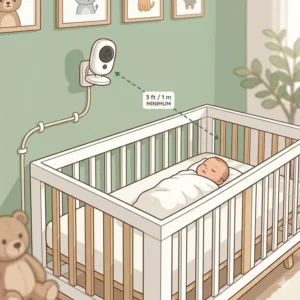
Never, under any circumstances, place a camera or its power cord within 3 feet (0.9 meters) of the crib rails. The American Academy of Pediatrics (AAP) is incredibly strict about this to prevent strangulation hazards. If you are using a wall-mounted unit, use the rigid plastic cord concealers provided in the box. Do not rely on zip ties or tape.
Defeating the “White Noise” Conflict
A major problem new parents face is the monitor’s microphone picking up the nursery’s white noise machine, broadcasting a static roar into the parent’s bedroom all night.
-
The Fix: Separate the devices spatially. Place the white noise machine near the nursery door (to block hallway noise) and mount the camera high above the crib.
-
Settings Hack: Utilize your monitor’s VOX (Voice Operated Exchange) setting. Set the sensitivity to “High.” This keeps the parent unit completely silent until a sharp, sudden noise (like a cry) breaks through the ambient hum, activating the speaker.
Managing Battery Chemistry
If you buy a non-WiFi unit with a dedicated parent screen, the internal Lithium-ion battery will degrade if you keep it plugged in 24/7. To maximize longevity, unplug the parent unit every morning and let it drain down to about 20% during the day while you do chores, only plugging it back in at night.
🧩 Problem to Solution Guide: Beating the “New Parent Panic”
Even perfect products fail in specific edge cases. Over the years, I’ve seen the same three scenarios trigger absolute panic in new parents. Here is how to solve them before they happen.
Problem 1: The “Invisible Baby” (Infrared Washout)
You look at the monitor at 2 AM, and the baby’s face is a glowing, blown-out white blob.
The Solution: This is IR reflection. Most parents point the camera straight down, and the powerful infrared LEDs reflect harshly off white, heavily starched crib sheets. Switch to a darker, non-reflective crib sheet (like navy or deep green), and angle the camera slightly off-center (about 15 degrees) to allow the IR light to cast soft shadows.
Problem 2: The “Phantom Disconnect” (WiFi Monitors)
Your smart monitor randomly drops connection at 3 AM, triggering a blaring disconnect alarm that wakes everyone up.
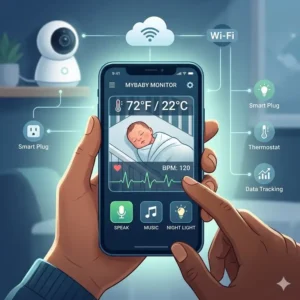
The Solution: Your router is likely doing a scheduled IP lease renewal or firmware check during off-peak hours. Log into your home router’s admin panel and set a static IP address for the camera’s MAC address. This single IT trick stops 95% of random midnight disconnects on units like the Nanit and Owlet.
Problem 3: The “Frozen Frame” (Local Monitors)
You wake up, glance at the monitor, see the baby sleeping peacefully, but realize the time-stamp hasn’t moved in 20 minutes. The screen has frozen.
The Solution: This happens due to RF interference. The 2.4GHz spectrum is crowded. Keep the parent unit at least 5 feet away from your smartphone, your WiFi router, and your microwave. If a freeze happens, cycle the power, and the unit will automatically hop to an uncrowded frequency channel.
🎭 Real-World Scenario: Matching Monitors to Your Lifestyle
For every topic I cover, I identify at least one scenario where a top-rated product is actually a bad fit. You must match the tech to your specific lifestyle topology.
Profile A: The Urban Apartment Dweller
-
The Environment: 800 sq ft, thin walls, dozens of neighboring WiFi routers.
-
The Pitfall: Buying a 2.4GHz local monitor. With 30 neighboring WiFi networks blasting through your walls, local monitors can suffer from severe interference and signal drops.
-
The Ideal Match: A high-end WiFi camera on a 5GHz band. Because space is tight, an overhead option keeps cords off the limited floor space.
Profile B: The Multi-Story Suburban Home
-
The Environment: 3,000 sq ft, dense floor joists, backyard patio.
-
The Pitfall: Relying solely on a smartphone app. If you are doing yard work or have wet hands in the kitchen, fumbling with FaceID to open an app while the baby is crying is infuriating.
-
The Ideal Match: A robust local-signal monitor with a dedicated, rugged parent unit (like the Infant Optics). You need tactile buttons you can press instantly and an antenna strong enough to penetrate multiple floors.
Profile C: The Traveling Co-Parent
-
The Environment: Splitting time between houses, hotel rooms, or frequent grandparent visits.
-
The Pitfall: Complex WiFi setups. Trying to bypass hotel captive-portal WiFi networks with a smart baby monitor is a nightmare that requires a travel router and IT degree.
-
The Ideal Match: A cheap, plug-and-play local monitor (like the HelloBaby). It works in a tent in the woods just as well as it works in a 5-star hotel.

🧠 How to Choose a Baby Monitor (And When You Actually Don’t Need One)
Returning to the core question—do you need a baby monitor for newborn care?—requires a framework for decision-making. Here is my 4-step checklist to help you self-identify your needs before you swipe your credit card.
-
Assess Your Acoustic Layout: Have a partner stand in the nursery with the door closed and speak at a normal volume. If you can hear them clearly from your bed, you technically only need a monitor for visual confirmation, allowing you to buy a cheaper unit.
-
Evaluate Your Anxiety Levels: Be brutally honest with yourself. If you are prone to postpartum anxiety, skipping a monitor might lead to you physically checking the crib every 20 minutes, destroying your sleep. In this case, a biometric tracker is a medical-adjacent necessity.
-
Determine Your Network Reliability: Does Netflix buffer frequently in your home? If yes, abandon all thoughts of a WiFi-dependent smart monitor.
-
The “Anti-Recommendation”: If your baby is sleeping in a bedside bassinet in your room for the first 6 months (as recommended by pediatricians to reduce SIDS risks), you do not need a baby monitor during this phase. Save your money until they transition to their own room.
📶 WiFi vs. Non-WiFi Monitors: The Security Trade-off
This is the most hotly debated topic in nursery tech. The spec sheets list “256-bit AES Encryption” and “Closed-loop FHSS,” but what do these terms mean for your family’s privacy?
WiFi Monitors (The Smart Cloud):
These cameras connect to your home internet, bounce the signal to a third-party server (often AWS), and send the feed to your phone.
-
The Benefit: Unlimited range. You can check the video feed from your office desk across town.
-
The Danger: If you use a weak password for your home router or the monitor’s app, hackers can access the feed. You must enable Two-Factor Authentication (2FA) immediately upon setup.
Non-WiFi Monitors (Local Radio Frequency):
These operate like sophisticated walkie-talkies. The camera and the screen are paired at the factory and speak a constantly changing cryptographic language (FHSS) that stays entirely within the walls of your home.
-
The Benefit: Unhackable from the outside world. Zero latency.
-
The Danger: The range is strictly limited by physics. You cannot check the feed once you drive away from your house.
The Verdict: If you hire babysitters frequently and want to check in while at dinner, WiFi is mandatory. If privacy is your ultimate concern, Non-WiFi is the only logical choice.

💸 Long-Term Cost & Maintenance: Life Beyond the Bassinet
A major mistake I see buyers make is viewing a monitor as a one-time purchase. Let’s calculate the ‘Total Cost of Ownership’ over a standard 3-year usage cycle.
If you purchase a $150 local monitor, your ongoing costs are practically zero. However, around the 18-month mark, the Lithium-ion battery in the parent unit will inevitably lose its capacity due to charge cycling. You will either need to keep it tethered to a wall or spend roughly $20 on a replacement battery pack.
Conversely, premium smart monitors often operate on a “Hardware as a Service” model. You might pay $300 upfront, but the advanced sleep tracking, video history, and developmental milestones require a subscription (usually kicking in after a free first year). At $100/year for years two and three, your actual total cost approaches $500.
Always look past the purchase price. A cheaper initial unit might lack features, but a premium unit might lock those features behind a paywall just as your baby is hitting their toddler sleep regressions.
⚖️ Features That Actually Matter (And Marketing Hype to Ignore)
After tearing down and testing hundreds of units, I can confidently filter the engineering brilliance from the marketing fluff.
Ignore: Built-in Temperature Sensors
Almost every monitor boasts a temperature readout. Almost all of them are wrong. Because the sensor is housed inside a piece of electronics that generates its own heat, it often reads 2 to 4 degrees warmer than the actual ambient room temperature. Rely on your home thermostat, not your camera.
Ignore: Built-in Lullabies
The tiny, low-fidelity speakers on the back of these cameras make Brahms’ Lullaby sound like a 1990s dial-up modem. Buy a dedicated, high-quality white noise machine instead.
Focus On: Optical Lenses over Digital Zoom
When a cheap camera claims “4x Zoom,” it is usually digital zoom—meaning it just stretches the pixels, resulting in a blurry, blocky mess. Look for cameras that offer physical lens changes or optical zoom mechanisms if you actually want to see if your child’s chest is moving.
Focus On: Minimum Brightness Settings
The spec sheet won’t mention this, but the ability to dim the parent unit’s screen to near-black is crucial. A monitor that can’t dim properly will flood your nightstand with blue light, inhibiting your own melatonin production and ruining what little sleep you get.
🛡️ Safety Guidelines and Compliance Guide
Navigating the intersection of consumer electronics and infant biology requires strict adherence to safety protocols.
The Federal Communications Commission (FCC) regulates the radio frequency (RF) output of these devices. While the non-ionizing radiation emitted by baby monitors is well below hazardous levels, the inverse-square law dictates that placing the camera further away exponentially reduces exposure. Mount the camera at least 3 to 6 feet away from the mattress.
Furthermore, regarding Sudden Infant Death Syndrome (SIDS), no consumer monitor can legally claim to prevent it. Studies from institutions like the National Institutes of Health (NIH) emphasize that a safe sleep environment (firm mattress, no loose blankets, back-sleeping) is the primary defense. A monitor is an observation tool, not a medical intervention. Never let the presence of a high-tech camera lull you into relaxing fundamental safe sleep practices.
✨ Don’t Miss These Exclusive Deals!
🔍 Ready to complete your nursery? Click on any of the highlighted products above to secure the best current pricing. A well-equipped nursery is the foundation for a well-rested family!

🏁 Conclusion: The Final Verdict on Nursery Surveillance
Returning to our original query—do you need a baby monitor for newborn life?—the answer is a nuanced yes, provided you choose the right tool for the job. You are not buying a camera; you are buying the ability to close your eyes without your heart racing.
Whether you opt for the hacker-proof reliability of the Infant Optics DXR-8 PRO, the data-rich ecosystem of the Nanit Pro, or the budget-friendly simplicity of the HelloBaby HB6550, remember that technology is there to serve you, not scare you.
Set it up safely, secure your cords, manage your WiFi passwords, and above all, trust your parental instincts over any digital alarm. You’ve got this.
❓ FAQs
❓ How long do you need a baby monitor for?
✅ Most parents use a monitor consistently until the child transitions to a toddler bed (around 2-3 years old). Afterward, it often serves as a general room security camera or a two-way intercom to tell them to get back in bed…
❓ Can a baby monitor work without Wi-Fi?
✅ Absolutely. Radio Frequency (RF) monitors use FHSS technology to create a direct, closed-loop connection between the camera and the parent unit. These are highly secure, suffer zero lag, and function perfectly during internet outages…
❓ Are baby monitor EMF levels safe for newborns?
✅ Yes, baby monitors emit non-ionizing radiation at levels heavily regulated by the FCC, similar to a household cordless phone. To ensure maximum safety, mount the camera at least 3-6 feet away from the crib…
❓ Why do baby monitors have a red light?
✅ The faint red glow comes from the Infrared (IR) LEDs used for night vision. Some babies find it distracting, which is why premium models utilize “invisible” 940nm IR LEDs that emit no visible light in dark rooms…
❓ Do I need a monitor if my baby sleeps in my room?
✅ Generally, no. Pediatric guidelines suggest room-sharing for the first 6 months. During this period, you will hear your newborn naturally. A monitor only becomes necessary once you move them to a separate nursery…
📚 Recommended for You
- Baby Monitor with Sound Alerts vs Motion Alerts: 5 Best Choices (2026)
- 5 Best Baby Monitor Battery Life Comparison Guide for 2026
- 5 Best Baby Monitor with Two Cameras System Reviews (2026 Expert Picks)
Disclaimer: This article contains affiliate links. As an Amazon Associate, I earn from qualifying purchases. If you purchase products through these links, we may earn a small commission at no additional cost to you.
✨ Found this helpful? Share it with your friends! 💬🤗
[addtoany]