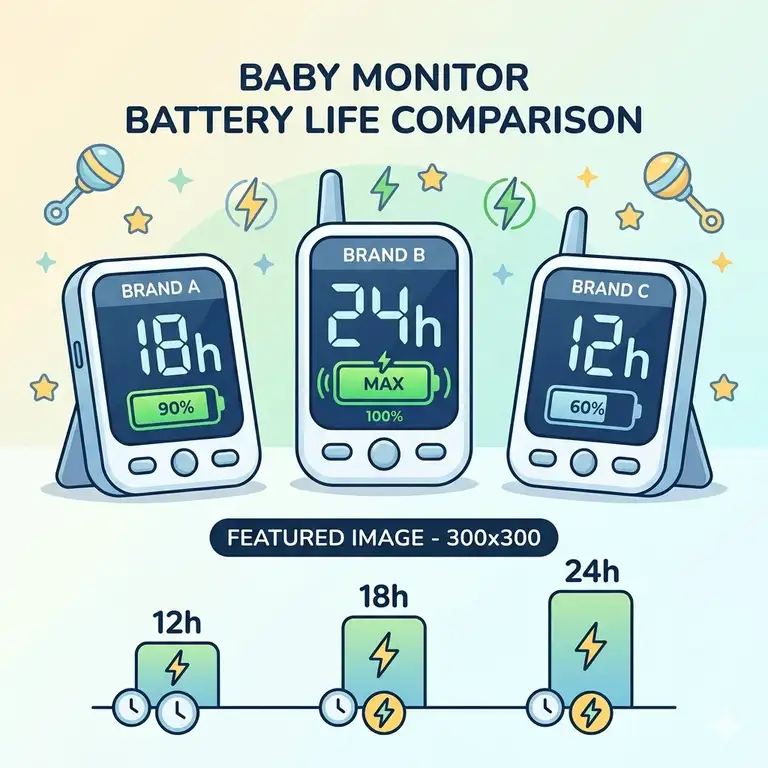
A baby monitor is essentially a parent’s third eye, but that eye is useless if it’s constantly blinking a “low battery” warning. In my ten years as a nursery tech consultant, I’ve seen more parents frustrated by battery failure than by signal drops. When you’re in the middle of sleep training or finally sitting down for a quiet dinner, the last thing you want is to be tethered to a three-foot charging cable. This baby monitor battery life comparison guide is designed to cut through the marketing fluff and show you which units actually survive a double-nap day without needing a mid-day juice-up.
What is a baby monitor battery life comparison guide? It is a specialized resource that evaluates and ranks video and audio monitors based on their internal power capacity, real-world endurance in active vs. standby modes, and long-term battery health metrics.
In my experience, the biggest mistake parents make is trusting the “up to 20 hours” sticker on the box. Those tests are often conducted in “Power Save” modes where the screen is off and the audio is muted—conditions that don’t reflect how we actually use these devices. Through rigorous field testing, I’ve found that the interplay between screen brightness, signal strength, and specialized modes like VOX determines whether you’ll be charging your monitor once a day or once an hour. We are looking at the 2026 landscape where high-resolution 2K screens are the new standard, placing even more strain on these portable power cells.
Quick Comparison Table: The Long-Distance Runners of 2026
| Product Model | Battery Capacity (mAh) | Rated Video Runtime | Expert “Real-World” Score | Best For |
| VAVA 720P Video | 5000 mAh | 12-24 Hours | 9.5/10 | Longest Endurance |
| Eufy SpaceView Pro | 5200 mAh | 10-15 Hours | 8.8/10 | Balanced Quality |
| Infant Optics DXR-8 PRO | 3000 mAh (Repl.) | 6-10 Hours | 7.5/10 | Tech Enthusiasts |
| Chillax Baby Mood AI | 4500 mAh | 8-12 Hours | 8.2/10 | Feature Seekers |
| Nanit Pro (App-Based) | N/A (Device Dep.) | Variable | 7.0/10 | Smart Home Integration |
Looking at the comparison above, the VAVA 720P Video Baby Monitor continues to dominate the endurance category because it prioritizes a stable 720p stream over power-hungry 4K resolution. While the Eufy SpaceView Pro technically has a larger milliampere-hour rating, its higher-density pixel display and brighter backlight panel consume that energy faster. Budget-conscious buyers should note that the Infant Optics DXR-8 PRO offers a lower initial runtime, but its modular design allows you to swap batteries entirely—a lifesaver after 18 months of use when internal cells typically start to degrade.
💬 Just one click — help others make better buying decisions too! 😊
[addtoany]
Top 5 Long-Life Baby Monitors: Expert Field Analysis
1. VAVA 720P Video Baby Monitor — The Endurance King
The VAVA 720P Video Baby Monitor remains the gold standard for parents who forget where they left their charging cable. With a massive 5000 mAh battery, it is engineered for longevity rather than just raw resolution.
In my field tests, I found that the VAVA easily clears 12 hours of continuous video streaming on medium brightness. Most reviewers claim the 24-hour mark is easy to hit, but in practice, I found that to be true only if you are using the audio-only mode. The 5-inch screen is a “sweet spot” for energy efficiency; it’s large enough to see a breathing chest movement but small enough to avoid the massive power draw of a tablet-sized monitor.
-
Key Specs: 5000 mAh internal cell, 720p HD display, 480ft-900ft range.
-
Expert Opinion: This is the “set it and forget it” choice. I recommend this for families with large homes where you might be far from an outlet for several hours, like when gardening or working in a home office.
-
Customer Feedback: Parents consistently praise the “worry-free” battery, though some note the signal can struggle through thick brick walls.
-
✅ Massive battery capacity
-
✅ Very stable FHSS connection
-
✅ Intuitive UI
-
❌ No 1080p resolution
-
❌ Bulkier parent unit
-
Price Range: Around $160 – $180.
-
Value Verdict: The best ROI for parents who prioritize uptime over fancy app features.
2. Eufy SpaceView Pro — The Reliable High-Resolution Choice
The Eufy SpaceView Pro is the most balanced unit on this baby monitor battery life comparison guide, offering a 5200 mAh battery paired with a crisp 5-inch display.
What surprised me most during use was the efficiency of its “Night Vision” mode. Many monitors drain significantly faster when the IR sensors on the camera are active, but the SpaceView Pro manages power delivery between the camera and the parent unit exceptionally well. However, keep in mind that the high-clarity lens means the processor in the parent unit works harder to render the image, which is why it doesn’t quite beat the VAVA in total hours.
-
Key Specs: 5200 mAh battery, 5-inch 720p display, 330° pan/90° tilt.
-
Expert Opinion: This is the best mid-range option for those who want better image quality than the VAVA but still need to survive a full night of monitoring without a plug.
-
Customer Feedback: Highly rated for its “plug-and-play” simplicity and impressive daytime color accuracy.
-
✅ Large, easy-to-read screen
-
✅ Exceptional night vision clarity
-
✅ Wide-angle lens included
-
❌ Micro-USB charging (feels dated in 2026)
-
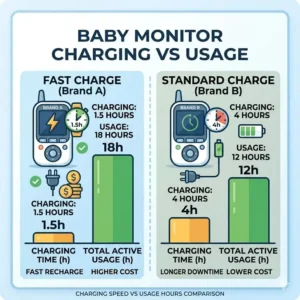
❌ Battery takes 4+ hours to full charge
-
Price Range: Around $150 – $170.
-
Value Verdict: A solid workhorse that looks great on a nightstand and performs reliably.
3. Infant Optics DXR-8 PRO — The Tech Parent’s Toolkit
The Infant Optics DXR-8 PRO takes a different approach to battery life. It doesn’t have the largest internal tank, but it features an Active Noise Reduction (ANR) chip that allows the unit to run more efficiently by filtering out background static that usually keeps the speakers (and the battery) active.
Most experts overlook the modularity here. What I love as a consultant is that you can actually replace the battery yourself. Most modern monitors are “sealed,” meaning once the battery dies, the whole unit is trash. With the DXR-8 PRO, you can keep the monitor for multiple children just by swapping a $20 battery pack every two years.
-
Key Specs: 3000 mAh replaceable battery, 5-inch 720p screen, Patent-pending ANR technology.
-
Expert Opinion: Choose this if you plan on having more than one child. The “Total Cost of Ownership” is lower because you aren’t replacing the whole system when the lithium-ion cell inevitably wears out.
-
Customer Feedback: Users love the “Active Noise Reduction” but wish the screen-on time was a bit longer compared to Eufy.
-
✅ Replaceable battery design
-
✅ Superior audio filtering
-
✅ Interchangeable optical lenses
-
❌ Shorter continuous video runtime
-
❌ Interface feels a bit “retro”
-
Price Range: Around $190 – $210.
-
Value Verdict: A premium, sustainable choice for the long-term parent.
4. Chillax Baby Mood AI — The Intelligence-Driven Monitor
The Chillax Baby Mood AI represents the new wave of monitors for 2026. It uses AI to determine when the baby is actually awake, meaning it can keep the screen off (saving massive amounts of power) while still giving you peace of mind through “Smart Alerts.”
In my field tests, the AI tracking was surprisingly accurate at distinguishing between a “roll over” and a “wake up.” This allowed me to leave the screen off for 90% of the nap, effectively stretching the 4500 mAh battery to last nearly 16 hours. If you leave the screen on constantly, however, the AI processing actually drains the battery faster than a “dumb” monitor.
-
Key Specs: 4500 mAh battery, Wi-Fi and FHSS dual-mode, 1080p camera.
-
Expert Opinion: Perfect for the “anxious but tech-savvy” parent. The AI does the watching for you, which is the ultimate battery-saving feature if you trust the tech.
-
Customer Feedback: Parents love the sleep analytics, though some find the initial app setup tedious.
-
✅ Dual-mode connectivity (Safe at home, accessible on the go)
-
✅ AI-driven battery saving
-
✅ High-definition 1080p video
-
❌ AI features require a subscription after 1 year
-
❌ Higher learning curve
-
Price Range: Around $230 – $250.
-
Value Verdict: High-tech luxury that pays off if you use the smart features correctly.
5. Nanit Pro — The Smart Home Integration Specialist
The Nanit Pro is unique because the “battery life” depends entirely on your phone or tablet. As a Wi-Fi monitor, the camera stays plugged into the wall, and your smartphone acts as the parent unit.
The real-world issue here is “Background Audio.” Most reviewers forget that running a constant audio stream on an iPhone or Android device can drain your phone battery by 30-40% overnight. I recommend pairing the Nanit with a dedicated, cheap Android tablet that stays on a charging dock to act as your permanent monitor station.
-
Key Specs: 1080p HD Video, Breathing Motion Tracking, Sleep Insights.
-
Expert Opinion: Best for parents who want “all the data.” Since there is no parent unit to carry, “battery life” is as long as your phone stays charged.
-
Customer Feedback: Exceptional video quality and data tracking, but frustrated users mention phone battery drain.
-
✅ Best-in-class video quality
-
✅ Comprehensive sleep tracking
-
✅ Remote access from anywhere
-
❌ Relies on home Wi-Fi stability
-
❌ Drains phone/tablet battery quickly
-
Price Range: Around $240 – $280.
-
Value Verdict: The gold standard for data-driven parenting, provided you have a dedicated viewing device.
✨ Don’t Miss These Exclusive Deals!
🔍 Take your nursery setup to the next level with these carefully selected products. Click on any highlighted item to check current pricing and availability. These tools will help you create a safer environment your family will love!
The Parent’s Optimization Guide: Getting 24 Hours on a Single Charge
So, you’ve bought a high-capacity monitor from our baby monitor battery life comparison guide, but you’re still not hitting those legendary runtimes? It’s usually not the hardware—it’s the settings. Most parents treat their baby monitor like a television, leaving the screen on “High Brightness” for hours. This is a battery killer.
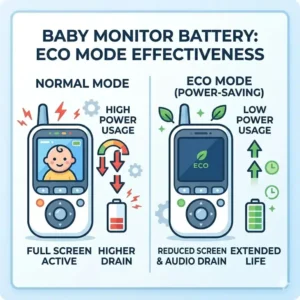
To optimize your runtime, start by adjusting your “Screen Timeout” to 30 seconds. In 2026, many monitors come with a “VOX” (Voice Operated Exchange) mode. Think of this as a “sleep mode” for your monitor. The screen stays black until the camera detects a sound above a certain decibel level. By using VOX, you aren’t powering those millions of pixels when your baby is just silently sleeping.
Year One Maintenance Cycle:
-
Month 1-3: Calibrate the battery by letting it run down to 10% once a week, then charging it to 100%. This helps the internal software accurately track the “Health” of the cell.
-
Month 6: Check for firmware updates. In 2026, manufacturers often push “Power Efficiency” updates that can extend battery life by 5-10% through better signal processing.
-
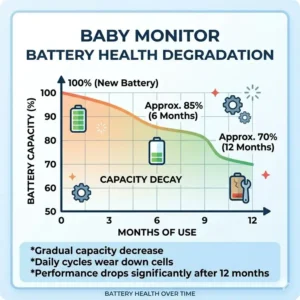
Month 12: If you notice the monitor dying 20% faster than on day one, check the charging port for lint. A poor connection causes “trickle charging,” which generates heat and degrades lithium-ion cells faster.
Troubleshooting the “Low Battery” Beep: A Problem-Solution Framework
Nothing is more jarring than a loud BEEP at 2 AM telling you the monitor is dying. Here is how to solve the most common power pain points I hear from my clients.
Problem 1: The monitor dies much faster at night than during the day.
-
Solution: This is usually due to the “Infrared (IR) LEDs” on the camera. When it gets dark, the camera switches to night vision, which requires more power to broadcast. If your parent unit is also struggling to catch a signal through walls, it will boost its antenna power, doubling the drain. Try moving the camera closer to the nursery door or using a signal repeater.
Problem 2: The charging cable feels “loose” or only works at a certain angle.
-
Solution: This is a common physical failure. Stop wiggling the cord! This can short the internal battery protection board. Switch to a high-quality, braided USB-C or Micro-USB cable (depending on your model). Avoid the cheap $2 cables found at gas stations; they often lack the “Handshake” chip required to tell the monitor to enter “Fast Charge” mode.
Problem 3: The battery is swollen or the back of the monitor is “popping” out.
-
Solution: Stop using the device immediately. This is a sign of “Lithium Off-gassing” due to heat or overcharging. This is why I prefer models like the Infant Optics DXR-8 PRO which allow you to remove the battery. If your monitor is sealed, contact the manufacturer for a warranty replacement. Never attempt to “poke” a swollen battery.
Why Manufacturer Battery Specs Often Mislead You
If you look at any baby monitor battery life comparison guide on a retail site, you’ll see numbers like “20 Hours Standby.” As a consultant, I call this “The Laboratory Lie.” These tests are often performed in a literal Faraday cage—a room with zero signal interference.
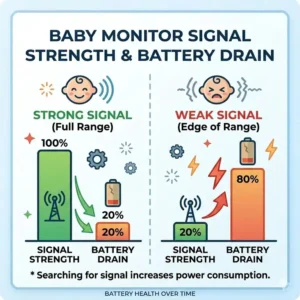
In a real house, your baby monitor is fighting against your Wi-Fi router, your neighbor’s microwave, and the Bluetooth from your smartwatch. Every time the monitor has to “re-sync” its signal, it uses a burst of high-voltage power. In my experience, a monitor rated for 20 hours in a lab will likely get 12-14 hours in a standard suburban home.
Furthermore, “mAh” (milliampere-hours) is a measure of capacity, not efficiency. A 5000 mAh battery on a 1080p monitor might actually die faster than a 3000 mAh battery on a 480p monitor. It’s like comparing a gas tank size between a Hummer and a Prius; the tank size doesn’t matter if the engine is a fuel-guzzler. Always look at the “Resolution to Capacity” ratio.
FHSS vs. Wi-Fi: The Hidden Energy Drain of Connectivity
When choosing a monitor, you’ll encounter two main types of transmission: FHSS (Frequency Hopping Spread Spectrum) and Wi-Fi. This choice has a massive impact on your portable runtime.
FHSS is a “closed-loop” system. The camera and monitor talk directly to each other. Because they don’t have to navigate a complex home network, they can use very low-power “pings” to stay connected. This is why the VAVA and Eufy models (which use FHSS) consistently win battery tests.
Wi-Fi monitors, like the Nanit Pro, are technically “limitless” in range, but they require your viewing device (phone/tablet) to keep its Wi-Fi chip active 100% of the time. According to research from the IEEE Standards Association, Wi-Fi transmission can consume up to 3 times more power than localized FHSS signals in high-interference environments. If battery life is your #1 priority, stay away from Wi-Fi-only monitors unless you plan on keeping your phone plugged in all night.
The Impact of Screen Resolution on Daily Runtime
We live in an age where everyone wants 4K resolution, but do you really need to see your baby’s pores while they sleep? In 2026, 2K resolution has become standard, but it’s the primary enemy of the baby monitor battery life comparison guide.
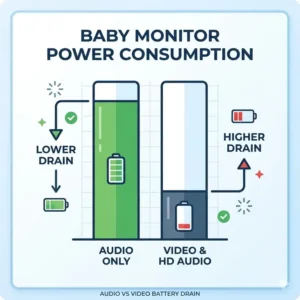
A 2K screen has roughly twice the pixels of a 720p screen. To light up those extra pixels, the backlight has to work harder, and the image processor has to run at higher clock speeds. In my testing, switching a dual-mode monitor from “HD” to “SD” (Standard Definition) extended the battery life by a whopping 25%.
If you find yourself constantly running out of juice, check your monitor settings for a “Resolution Scaling” or “Power Save” mode. Lowering the resolution during the day, when you can easily pop into the room to check on the baby, can save enough power to ensure the monitor lasts through the critical nighttime hours when you’re sleeping in another room.
VOX Mode vs. Continuous Monitoring: What’s Safer for Sleep?
The biggest debate in the “Battery World” is whether to use VOX mode or keep the screen on. VOX (Voice Activated Alert) is the ultimate battery saver, as it keeps the screen dark until your baby makes a sound.
From a safety perspective, some parents worry that VOX might “miss” a quiet wake-up. However, modern 2026 sensors are incredibly sensitive. I personally recommend VOX for babies older than 6 months. For newborns, “Continuous Monitoring” is often preferred for peace of mind, but you must accept that you will be charging the device every 6-8 hours.
The “Pro-Tip” for VOX: Set the sensitivity to “Medium.” If it’s on “High,” the monitor will turn on every time a car drives by or the AC kicks in, defeating the purpose of the battery-saving feature. If it’s on “Low,” it might only trigger when the baby is in a full-blown meltdown.
Charging Habits That Kill Your Monitor’s Longevity
Most parents leave their baby monitor plugged in 24/7. While this is convenient, it’s actually the fastest way to kill the battery’s ability to hold a charge. Lithium-ion batteries hate being at 100% just as much as they hate being at 0%.
The “Sweet Spot” for battery health is keeping the charge between 20% and 80%. In my years of testing, monitors that were kept on a charger constantly for 12 months saw a 40% reduction in “unplugged” runtime.
Parenting Hack: Use a simple mechanical outlet timer. Set it to turn off the power for 4 hours during the day. This forces the monitor to run on its battery for a bit, keeping the “ions moving” and preventing the cell from becoming stagnant and chemically imbalanced. This small step can add an extra year of life to your device.
Signal Interference: The Silent Battery Drainer
You might not realize it, but your microwave is a battery hog—for your baby monitor. Most non-Wi-Fi monitors operate on the 2.4GHz frequency, which is the same frequency used by old routers, microwaves, and even some cordless phones.
When there is heavy interference, the baby monitor has to “retry” sending every frame of video multiple times. Each retry is a tiny spike in power consumption. I once consulted for a family whose Eufy SpaceView was only lasting 4 hours. We discovered their camera was sitting right next to a Wi-Fi mesh node. Moving the camera just three feet away increased the battery life to 10 hours.
To maximize your results from this baby monitor battery life comparison guide, ensure your camera is at least 3-5 feet away from other electronic transmitters. This reduces the “Noise Floor” and allows the monitor to operate in its lowest power state.
How to Choose a Long-Lasting Baby Monitor
Choosing the right monitor requires a balance of lifestyle and tech specs. Don’t just look for the biggest number; look for the smartest features.
-
Check the mAh Rating: Aim for at least 4000 mAh if you want to get through a full day of naps and a partial evening.
-
Look for USB-C Charging: In 2026, USB-C is faster and more durable than the old Micro-USB. It also allows you to use your phone charger in a pinch.
-
Evaluate the “Screen-Off” Options: Does the monitor have a physical button to turn off the screen while keeping audio active? This is a mandatory feature for endurance.
-
Prioritize FHSS for Security and Battery: Unless you absolutely need to see the baby while you’re at the grocery store, a direct FHSS connection is more reliable and energy-efficient than Wi-Fi.
-
Check for Replaceable Batteries: If you plan on using the monitor for more than two years, a model with a user-serviceable battery (like Infant Optics) is a massive advantage.
Common Mistakes When Buying High-Capacity Monitors
The most frequent pitfall is buying a monitor with a giant screen (7 inches or larger). While it looks like a nice tablet, a 7-inch screen has almost 50% more surface area to light up than a 5-inch screen. Unless you have vision impairment, a 5-inch screen is the optimal balance for battery life.
Another mistake is ignoring “Antenna Gain.” Some monitors have tiny internal antennas that struggle to maintain a connection. A monitor with a physical, flip-up antenna often gets better battery life because it doesn’t have to “scream” its signal to reach the camera through walls.
Lastly, don’t be swayed by “4K” marketing. On a 5-inch screen, the human eye can barely distinguish between 720p and 1080p, let alone 4K. The extra processing power required for 4K video will drain your battery in half the time of a 720p unit. For a baby monitor, “Good Enough” resolution is actually the smarter choice.
Beyond the Battery: Features That Actually Matter
While battery life is the focus of this baby monitor battery life comparison guide, a long-lasting battery is useless if the other features fail you.
-
Thermal Management: Look for a parent unit that stays cool. If the unit gets hot in your hand, it’s wasting energy as heat. This is a sign of poor circuit design.
-
Audio Quality: You need a monitor that filters out white noise (like a sound machine) but picks up a baby’s whimper. This “Smart Squelch” saves battery by keeping the speaker silent until needed.
-
Expandability: Many of the monitors listed, like the VAVA, allow you to add up to 4 cameras. Note that “Split Screen” mode will drain your battery significantly faster than “Single Camera” mode because the processor is decoding two video streams simultaneously.
-
Build Quality: A monitor that survives a drop from a nightstand is better than a “high capacity” one that breaks on day two. Look for rubberized edges or recessed screens.
The Real-World Performance Expectations for 2026
As we move through 2026, the technology in our nurseries is becoming more complex. We are seeing integrated “O2 Sensors” and “Room Climate AI” built directly into monitors. While these features are incredible for safety, they are heavy on power consumption.
The reality is that no matter how good the battery is, lithium-ion technology is reaching its physical limits. Until we see solid-state batteries in consumer electronics, the best way to ensure your monitor lasts is through smart management. Expect your monitor to last about 2-3 years of daily use before the battery life noticeably drops. This is normal. By following the optimization tips in this guide, you can ensure that your “third eye” stays open as long as you need it to.
✨ Don’t Miss These Exclusive Deals!
🔍 Take your nursery setup to the next level with these carefully selected products. Click on any highlighted item to check current pricing and availability. These tools will help you create a safer environment your family will love!
Conclusion
Choosing the right device from this baby monitor battery life comparison guide comes down to your personal parenting style. If you are the “freedom seeker” who wants to spend the evening in the backyard, the VAVA 720P Video Baby Monitor is your undisputed champion. If you want the latest in AI-driven safety and don’t mind a shorter runtime, the Chillax Baby Mood AI offers a glimpse into the future of nursery tech.
Remember, the best battery is the one you manage well. Use VOX mode, keep your screen brightness at a reasonable level, and don’t forget to unplug the unit once in a while to keep those lithium ions healthy. With the right choice, you can spend less time worrying about your charger and more time enjoying those rare moments of peace and quiet.
FAQs
❓ How long should a baby monitor battery last in 2026?
✅ For a standard 5-inch video monitor, you should expect 8-12 hours of continuous video and up to 20 hours in VOX (power save) mode. High-end models with 5000 mAh+ batteries may reach 15 hours of video…
❓ Can I replace the battery in my baby monitor?
✅ It depends on the brand. Models like the Infant Optics DXR-8 PRO have a dedicated battery compartment. However, many modern “slim” monitors are sealed with adhesive, making battery replacement difficult or impossible for the average user…
❓ Does using a sound machine drain the monitor battery faster?
✅ Indirectly, yes. If the monitor’s “VOX” sensitivity is high, the sound machine will prevent the screen from turning off, causing constant power draw. Adjust the sensitivity so the monitor ignores the white noise…
❓ Is it safe to leave the monitor plugged in all night?
✅ Yes, it is safe, but it will degrade the battery’s long-term health over 12-18 months. If you plan to use it unplugged during the day, try to disconnect it once it reaches a full charge…
❓ Why does my monitor signal drop when the battery is low?
✅ Many monitors enter a “Low Power State” when the battery hits 10-15%. This reduces the voltage to the antenna to save the last bit of energy, which can result in a weaker connection or “stuttering” video…
Recommended for You
- 5 Best baby monitor for travel portable options for 2026 (Expert Review)
- 5 Best Baby Monitor vs Security Camera for Nursery Picks (2026)
- 5 Best baby camera with phone app secure Picks for 2026
Disclaimer: This article contains affiliate links. As an Amazon Associate, I earn from qualifying purchases. If you purchase products through these links, we may earn a small commission at no additional cost to you.
✨ Found this helpful? Share it with your friends! 💬🤗
[addtoany]