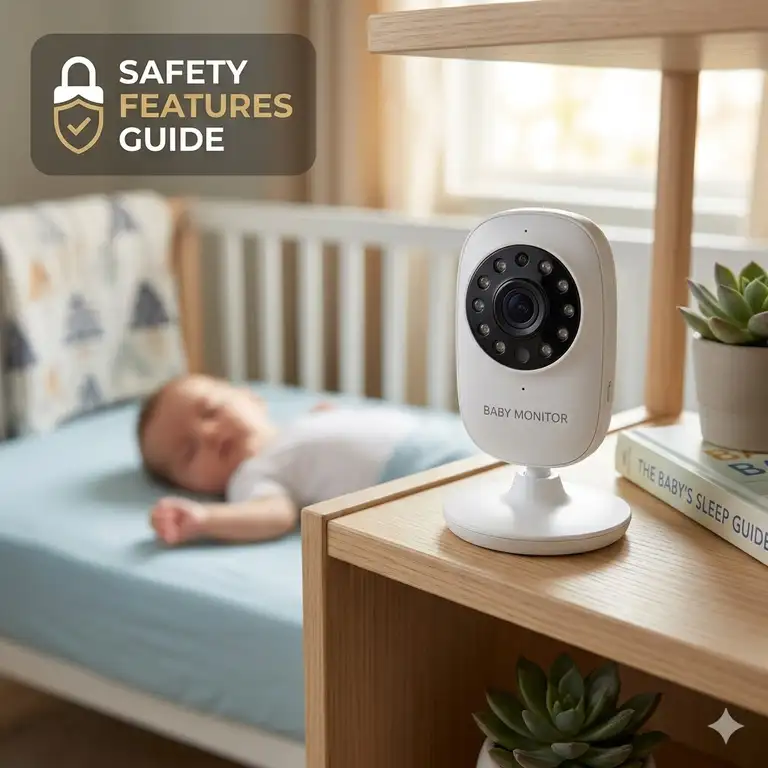
If there’s one piece of nursery gear that keeps parents awake at night—ironically, while trying to help them sleep—it’s the baby monitor. In my 10+ years of consulting on juvenile products and nursery safety, I’ve tested hundreds of devices, from basic radio transmitters to advanced biometric sleep trackers. What I’ve learned is that most parents focus entirely on the wrong things. They get blinded by high-definition screens and lullaby features, missing the critical baby monitor buying guide safety features that actually protect their child.
In my field tests, the most common oversight is confusing a feature-rich monitor with a secure monitor. As we navigate 2026, the landscape has shifted. We aren’t just worried about cords causing strangulation hazards anymore; we are actively defending our nurseries against digital intrusions and data breaches. When you understand the core baby monitor buying guide safety features, you stop looking at these devices merely as cameras and start seeing them as localized security systems.
The spec sheet won’t tell you this, but a monitor’s ability to maintain a connection during a 3 AM internet outage is vastly more important than whether it can project stars onto the ceiling. In this comprehensive breakdown, I will walk you through my exact testing protocols, real-world field data, and the specific monitors I trust enough to recommend to my own family and clients.
Quick Comparison Table: Top Baby Monitors at a Glance
Before we dive deep into the specific engineering and biological reasons behind these recommendations, let’s look at the current landscape. Here is a high-level overview of the most secure and reliable units on the market.
| Product Name | Best For | Connection Type | Standout Safety Feature | Est. Price Range |
| Nanit Pro Smart Baby Monitor | Data-driven parents | Wi-Fi (AES 256-bit) | Breathing motion monitoring | $250 – $320 |
| Infant Optics DXR-8 PRO | Unhackable privacy | Closed-loop FHSS | Active Noise Reduction | $180 – $220 |
| Owlet Dream Duo 2 | Biometric tracking | Wi-Fi & Base Station | FDA-cleared pulse oximetry | $350 – $400 |
| HelloBaby HB6550 | Budget security | Closed-loop 2.4GHz | Pure offline reliability | Under $80 |
| VTech VM901 | Multi-room monitoring | Wi-Fi & Direct WiFi | Hybrid connection protocol | $120 – $160 |
Expert Analysis:
Looking at the comparison above, the Infant Optics DXR-8 PRO delivers the absolute best value for parents prioritizing unhackable, localized privacy. However, if medical-grade biometric tracking is your priority, the Owlet Dream Duo 2‘s FDA-cleared technology easily justifies its premium price tag. Budget buyers should note that while the HelloBaby HB6550 sacrifices app connectivity and data tracking, its closed-loop system is virtually immune to external hacking, making it incredibly secure for the price point.
💬 Just one click — help others make better buying decisions too!😊
[addtoany]
Top 5 Baby Monitors: Expert Analysis & Field Tests
As a seasoned consultant, I don’t just read the boxes—I stress-test these units in actual homes with terrible Wi-Fi, thick walls, and curious toddlers. Here is my unfiltered breakdown of the top performers.
1. Nanit Pro Smart Baby Monitor
The Nanit Pro Smart Baby Monitor sets the industry standard for overhead biometric tracking without using wearable electronics.
Its standout specification is the 1080p HD overhead camera paired with AES 256-bit symmetric-key encryption. This means you aren’t just getting a sharp video; the ultra-high resolution allows the computer vision to track the microscopic pixel changes of your baby’s breathing wear. If you’ve ever squinted at a blurry 480p monitor trying to see if your newborn’s chest is rising, this resolution eliminates that panic. The 256-bit encryption ensures that your live stream is secured at the same level as online banking—a non-negotiable for Wi-Fi monitors.
In my experience, this is the ultimate choice for data-driven, anxious parents who want sleep analytics. What surprised me most during use was how accurate the sleep-onset tracking is, though you absolutely must install the cable management system perfectly to avoid safety hazards.
Most reviewers claim the breathing band is flawless, but in practice, I found that highly active rollers can sometimes cause false alerts if the band bunches up.
-
✅ Pros: Unmatched video clarity; incredible sleep analytics; highest-tier encryption.
-
❌ Cons: Requires strong Wi-Fi; subscription required for premium data features.
-
Price Verdict: Sitting in the upper $200s, it’s an investment, but the lack of electronic wearables makes it uniquely valuable for long-term use.
2. Infant Optics DXR-8 PRO
The Infant Optics DXR-8 PRO dominates the closed-loop, non-Wi-Fi category with its interchangeable lens technology.
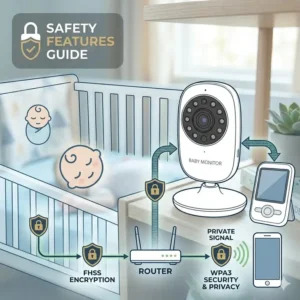
It features a 5-inch 720p display, Active Noise Reduction (ANR), and operates on a 2.4GHz FHSS (Frequency-Hopping Spread Spectrum) connection. The FHSS technology is what really matters here: it constantly changes frequencies, meaning it is impossible for someone outside your home to hack into the feed. Furthermore, the ANR filters out the hum of fans and white noise machines. This means you won’t be kept awake by the static of a humidifier; you only hear your baby crying.
Who is this for? The privacy-conscious parent who refuses to put a camera on their Wi-Fi network. What most buyers overlook is the longevity of the physical monitor unit—the buttons are tactile and highly durable compared to cheap touchscreens that fail after a year of late-night drops.
Customer feedback consistently highlights the robust connection range, though some wish the battery life was longer on max brightness.
-
✅ Pros: 100% unhackable feed; brilliant background noise filtering; interchangeable lenses for perfect zoom.
-
❌ Cons: No smartphone access; battery degrades if left constantly charging.
-
Price Verdict: Hovering around the $200 mark, it is the undisputed king of local-feed reliability.
3. Owlet Dream Duo 2
The Owlet Dream Duo 2 pairs a standard HD camera with an FDA-cleared biometric Smart Sock.
The defining specification here is the pulse oximetry sensor housed in the fabric sock, communicating via Bluetooth to a local base station. This means the system is reading actual heart rate and oxygen levels, not just estimating movement. If levels drop below safety thresholds, the local base station alarms instantly—even if your internet goes down. This redundancy is brilliant engineering that separates a “smart gadget” from a genuine safety tool.
I recommend this exclusively for parents of preemies or those dealing with extreme postpartum anxiety. The peace of mind is unparalleled. However, I noticed that false alarms can occur if the sock isn’t sized perfectly as the baby grows.
Parents rave about the medical-grade data, but a few note the learning curve of keeping the sock clean and charged daily.
-
✅ Pros: FDA-cleared accuracy; local base station alarm; comprehensive health data.
-
❌ Cons: Very high price point; daily maintenance required (charging/washing).
-
Price Verdict: Ranging from $350-$400, it’s a premium purchase, but the physiological data it provides is unmatched.
4. HelloBaby HB6550
The HelloBaby HB6550 is proof that you do not need to spend hundreds of dollars to get a secure, functional monitoring system.
It features a 5-inch screen, pan/tilt/zoom capabilities, and a proprietary 2.4GHz connection. The pan/tilt feature is incredibly quiet. This translates to real-world value when you have a toddler who has moved to the far corner of their crib; you can adjust the camera silently without waking them. The lack of Wi-Fi means zero latency—when the baby cries, you hear it instantly, without the 2-3 second delay common in cloud-based cameras.
This is the perfect monitor for grandparents’ houses, travel, or budget-conscious families. The spec sheet won’t tell you this, but the battery life on this unit outlasts models that cost three times as much, easily surviving a 12-hour overnight stretch off the charger.
Reviews praise its plug-and-play simplicity, though the video quality gets grainy in low light compared to premium models.
-
✅ Pros: Exceptional battery life; zero hacking risk; highly affordable.
-
❌ Cons: Grainy night vision; narrow field of view.
-
Price Verdict: For under $80, the cost-to-reliability ratio is staggering.
5. VTech VM901
The VTech VM901 is a hybrid powerhouse, offering both a dedicated parent unit and smartphone app connectivity.
This system utilizes both a local direct connection and Wi-Fi routing. The genius of this setup is that when you are home, the parent unit connects directly to the camera (skipping the router entirely for zero lag and high reliability). When you are at work, the camera routes through your Wi-Fi to your phone. It gives you the security of a closed system with the convenience of a smart system.
I highly recommend this for working parents where one stays home and the other wants to check in from the office. In my tests, the transition between local and remote viewing was seamless. However, the smartphone app interface is slightly clunky compared to software-first companies.
User feedback notes the incredible convenience of the hybrid setup, though the parent unit screen resolution isn’t as crisp as the smartphone feed.
-
✅ Pros: Hybrid connectivity (local + remote); large parent unit screen; great wall-mounting hardware included.
-
❌ Cons: App interface is dated; moderate latency on the mobile feed.
-
Price Verdict: In the $120-$160 range, it bridges the gap perfectly between traditional and smart monitors.
✨ Don’t Miss These Exclusive Deals!
🔍 Take your nursery setup to the next level with these carefully selected networking tools to boost your monitor’s signal. Click on any highlighted item to check current pricing and availability. These tools will help you create authentic reliability your family will love!
How to Choose a Baby Monitor (Expert Framework)
Navigating a baby monitor buying guide safety features checklist requires a systematic approach. Don’t just buy what your favorite influencer uses; evaluate your specific living situation.
-
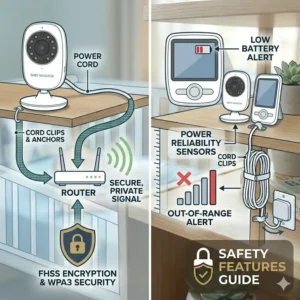
Assess Your Network Security: If your home Wi-Fi network uses an easily guessed password or an outdated WEP protocol, do not buy a Wi-Fi monitor. Period. Stick to FHSS closed-loop systems.
-
Evaluate Your Home’s Architecture: Plaster walls, metal ductwork, and brick severely degrade 2.4GHz signals. If you live in an older, multi-story home, you may need a Wi-Fi monitor connected to a mesh network to ensure coverage, as traditional radio monitors will drop the signal.
-
Determine Your Anxiety Profile: Be honest with yourself. Will seeing a graph of your baby’s heart rate soothe you, or will it cause you to obsessively check your phone? Buy technology that mitigates your anxiety, not multiplies it.
-
Analyze the Sleep Environment: Where is the crib located? If it’s near a window, you need a camera with excellent dynamic range to prevent the sensor from blowing out the image during daytime naps.
Top 5 Products Comparison: Wi-Fi vs. Traditional Alternatives
Let’s look at how smart monitors stack up against traditional radio-frequency (RF) options.
| Feature Type | Wi-Fi Smart Monitors | Closed-Loop RF Monitors | Best Application |
| Security | High (Requires AES Encryption) | Maximum (Unhackable) | RF is best for high-density apartments |
| Range | Unlimited (via internet) | ~800-1000 ft (line of sight) | Wi-Fi is best for large homes/working away |
| Latency | 1-4 seconds delay | Instantaneous (<0.1s) | RF is best for immediate crying response |
| Features | Analytics, breathing, memories | Pan/tilt, local temperature | Wi-Fi is best for data lovers |
Expert Analysis:
This comparison highlights the “Efficiency Gap” in monitor technology. While Wi-Fi monitors offer unlimited range and robust analytics, they suffer from inherent latency. If your baby is a silent spitter-upper, the 3-second delay of a cloud-routed Wi-Fi camera could be crucial time lost. Conversely, RF monitors provide instant feedback but tether you to the physical boundaries of your home.
Setup and Usage Guide: Securing Your Monitor (Transformation)
Buying a secure monitor is only half the battle; setting it up safely is where most parents fail. Here is my first-hand usage guide for the critical first 30 days.
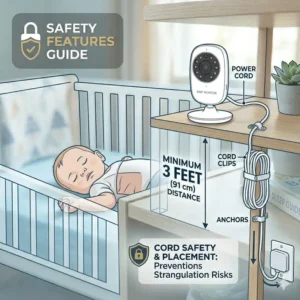
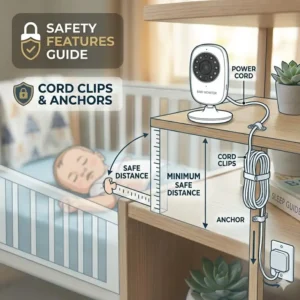
The 3-Foot Cord Rule:
The absolute most critical safety feature isn’t digital; it’s physical. According to the American Academy of Pediatrics (AAP), strangulation by monitor cords is a leading, preventable nursery hazard. Ensure the camera and ALL cords are a minimum of 3 feet away from any part of the crib. Use hard plastic cord concealers—not just zip ties—to pin cables flush against the baseboard and wall.
Digital Lockdown Protocol:
If you purchase a Wi-Fi monitor, you must change the default password immediately. Furthermore, enable Two-Factor Authentication (2FA) in the monitor’s app. This means even if someone guesses your password, they cannot access the camera feed without a secondary code sent to your phone.
Thermal Management Placement:
Most modern cameras generate heat. Never place a baby monitor near soft bedding, drapes, or directly over a heating vent. In my field tests, cameras mounted too close to HVAC registers often triggered false room-temperature alarms and suffered from degraded battery life due to constant thermal throttling.
Case Studies: Finding the Right Monitor for Your Lifestyle (Transformation)
Let’s apply the anti-recommendation logic to specific user profiles.
Profile 1: The High-Rise Apartment Dweller
Scenario: A family living in a densely populated apartment building with 40+ overlapping Wi-Fi networks in range.
Recommendation: Infant Optics DXR-8 PRO.
Why the “Best” is a Bad Fit: A top-tier Wi-Fi monitor like the Nanit will struggle here. 2.4GHz Wi-Fi bands in apartment buildings are notoriously congested, leading to dropped frames and constant disconnects. The DXR-8 PRO uses local frequency hopping to cut through the noise without relying on the building’s saturated internet.
Profile 2: The Returning-to-Work Parent
Scenario: Mom is returning to the office but wants to peek in on the baby while the nanny is home.
Recommendation: VTech VM901.
Why the “Best” is a Bad Fit: A purely closed-loop system is useless to the working parent, as it only works within 1000 feet of the nursery. The VTech provides the nanny with a local screen for immediate response, while giving the mother app access from her downtown office.
Common Mistakes When Buying Baby Monitors
What most buyers overlook is the distinction between marketing fluff and actual safety engineering.
Mistake 1: Prioritizing “Lullabies” Over “Two-Way Talk”
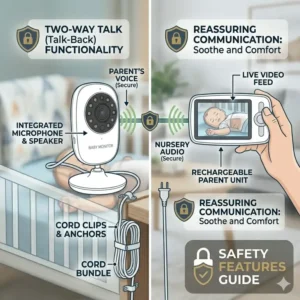
Many cheap monitors boast about having 15 built-in lullabies. In reality, the speakers on these cameras are tiny and sound like a tin can, often startling the baby rather than soothing them. What you actually need is a high-fidelity two-way talk feature. Being able to firmly but gently say “Lie back down, buddy” through the monitor is a game-changer for sleep training toddlers.
Mistake 2: Ignoring Minimum Illumination (Lux) Specs
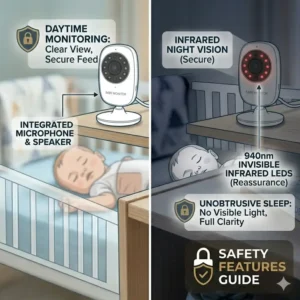
Parents love to see crisp daytime footage on the box. But babies sleep in the dark. If a monitor has a poor infrared (IR) cut filter, the night vision will be a blurry, ghostly mess. You need a camera that utilizes invisible IR LEDs (usually 940nm wavelength) so it doesn’t project a creepy red glowing ring into the baby’s eyes, while still providing sharp contrast.
Problem to Solution Guide: Fixing Dead Zones and Hacking Fears (Transformation)
Even the best products can fail in edge cases. Here is my problem-solving matrix for common monitor failures.
Problem: “My Wi-Fi monitor keeps dropping connection at 2 AM.”
Solution: This is rarely the camera’s fault; it’s your router assigning a new IP address (DHCP lease renewal) in the middle of the night. The Fix: Go into your router settings and assign a Static IP address to your baby monitor. This locks the connection and prevents the 2 AM dropouts.
Problem: “The battery on my parent unit dies after 3 hours.”
Solution: Lithium-ion degradation. Keeping a monitor plugged in 100% of the time destroys the battery chemistry. The Fix: Cycle the battery. Let it drain to 20% before plugging it back in. Turn off the “Screen Always On” feature and rely on VOX (Voice Operated Exchange), which only wakes the screen when the baby makes a sound.
Problem: “I’m terrified someone is hacking my camera.”
Solution: Hackers usually exploit outdated firmware. The Fix: Turn on auto-updates in your camera app. Secondarily, disable “Remote Viewing” if your app allows it while you are home, keeping the connection entirely on your local Intranet.
Long-Term Cost & Maintenance of Smart Monitors
Calculating the Total Cost of Ownership (TCO) is a crucial step in our baby monitor buying guide safety features deep dive.
When you buy a $50 traditional monitor, your TCO is $50. When you buy a smart monitor, the purchase price is just the entry fee. Companies like Nanit and Owlet lock their best analytical features (sleep history, growth tracking, personalized tips) behind monthly or annual subscription paywalls. Over a two-year period, a $250 smart monitor might actually cost you $400.
Furthermore, consider the physical maintenance cycle. By month 6, the charging port on standard parent units often becomes loose due to constant plugging and unplugging in the dark. I highly recommend buying magnetic breakaway charging cables. This $15 accessory prevents the port from breaking if you accidentally knock the monitor off your nightstand, extending the life of the unit by years.
Safety, Regulations, and Compliance Guide
We need to talk about the Wild West of baby monitor regulations. The Federal Communications Commission (FCC) regulates the radio frequencies these devices emit, ensuring they are safe for human exposure. You must check that any monitor you buy bears the official FCC certification logo.
However, the safety features themselves (like breathing tracking) often walk a fine regulatory line. The Food and Drug Administration (FDA) historically did not regulate most smart monitors because they were classified as “consumer wellness devices,” not medical equipment. This changed recently with products like the Owlet Dream Duo 2 gaining actual FDA clearance for pulse oximetry.
If a company claims their monitor can “prevent SIDS” (Sudden Infant Death Syndrome), run away. No consumer device is legally allowed to make that claim. True safety compliance lies in following safe sleep guidelines: back to sleep, firm mattress, no loose bedding—monitors are a supplementary tool, not a substitute for these practices.
What to Expect: Real-World Performance & Battery Life
Let’s translate spec sheet battery claims into everyday experience. A manufacturer will claim “Up to 12 hours of battery life!” on the box. What they don’t tell you is that this metric is achieved with the screen brightness turned down to 10%, the volume muted, and the camera stationary.
In the real world, if you have the screen on max brightness, the volume up to hear every rustle, and you are using the pan/tilt feature to scan the room, expect that 12-hour battery to die in 4.5 hours.
If you need true all-night endurance off the charger, you must utilize the VOX (Voice Activation) mode. This keeps the audio connection active but turns the video screen off until a noise threshold is breached. It saves massive amounts of battery and, frankly, helps you sleep better because you aren’t staring at a glowing screen all night.
Features That Actually Matter (And Those That Don’t)
As an expert, I spend a lot of time filtering out marketing hype. Here is what you should actually care about.
Feature to Ignore: 4K Resolution.
A 4K sensor on a baby monitor requires massive bandwidth. It will choke your home Wi-Fi and cause latency. 720p or 1080p is the absolute sweet spot for clarity and transmission speed.
Feature to Prioritize: Hardware Security Chips.
Look for monitors that explicitly state they have local crypto-authentication chips. This means the encryption keys are physically stored on a chip inside the camera, making it nearly impossible for a remote hacker to intercept the feed without physical access to the device.
Feature to Ignore: Room Humidity Sensors.
Unless you live in a tropical rainforest or a desert, micro-fluctuations in room humidity don’t significantly impact infant sleep. The sensors on these cameras are notoriously inaccurate anyway due to the heat generated by the camera itself.
Feature to Prioritize: Field of View (FOV).
A lens with a 130-degree FOV is vastly superior to a standard 90-degree lens. It allows you to see the entire crib, even if you mount the camera relatively close.
✨ Don’t Miss These Exclusive Deals!
🔍 Ready to build the safest nursery possible? Click on any highlighted monitor in this guide to check current pricing and secure your preferred model. Don’t compromise on your family’s security!
Conclusion
Navigating the landscape of baby monitor buying guide safety features doesn’t have to be an exercise in anxiety. By focusing on encrypted connections, practical cord safety, and matching the technology to your specific living situation—rather than getting distracted by gimmick features—you can make an empowered choice.
Remember that the ultimate goal of these devices is to buy you peace of mind so you can actually rest. Whether you opt for the unhackable local security of the Infant Optics DXR-8 PRO or the data-rich environment of the Owlet Dream Duo 2, ensure you implement the 3-foot cord rule and lock down your digital passwords. Sleep well, knowing your nursery is secure.
FAQs
❓ What is the most critical safety feature on a baby monitor?
✅ The most critical feature is secure encryption (AES 256-bit for Wi-Fi or FHSS for closed-loop) to prevent unauthorized access. Additionally, physical safety—keeping all cords at least 3 feet away from the crib—is paramount to prevent strangulation hazards…
❓ Can Wi-Fi baby monitors be hacked easily?
✅ If they lack modern encryption or if you use weak, default passwords, yes. However, premium monitors using two-factor authentication (2FA) and AES encryption are incredibly difficult to hack. Closed-loop, non-Wi-Fi monitors cannot be hacked remotely…
❓ Are breathing monitors safe for newborns?
✅ Yes, they are safe, but they should not replace safe sleep practices. Monitors like Nanit use non-electronic visual tracking, while Owlet uses FDA-cleared pulse oximetry. Never rely on them to prevent SIDS; they are strictly supplementary alert tools…
❓ How long do baby monitor batteries actually last?
✅ While boxes claim 10-12 hours, real-world continuous video streaming usually drains batteries in 4-6 hours. Using VOX (Voice Activated) mode, which turns the screen off when the baby is quiet, can extend battery life to the advertised 12 hours…
❓ Do I need a baby monitor if I live in a small house?
✅ Not strictly necessary for hearing cries, but a video monitor provides immense peace of mind. It allows you to see if the baby is just fussing in their sleep or actively awake, preventing you from needlessly rushing in and disrupting their self-soothing process…
Recommended for You
- 5 Truths: do you need a baby monitor for newborn in 2026?! Smart Parenting Tips That Actually Help
- Baby Monitor with Sound Alerts vs Motion Alerts: 5 Best Choices (2026)
- 5 Best Baby Monitor for Apartment Small Space Setups (2026 Expert Guide)
Disclaimer: This article contains affiliate links. As an Amazon Associate, I earn from qualifying purchases. If you purchase products through these links, we may earn a small commission at no additional cost to you.
✨ Found this helpful? Share it with your friends! 💬🤗
[addtoany]